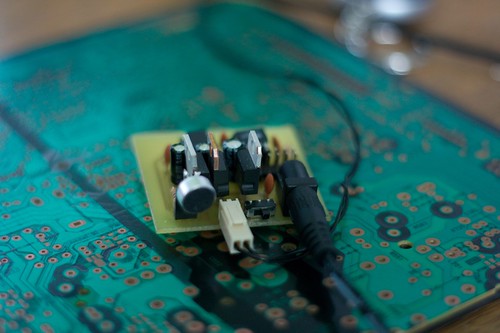
Final Lightbar Controller

I’ve finished the lightbar controller!

Lightbar Visualiser

This device analyses the music it picks up via the electret microphone, then flashes the LEDs in time to the music. It’s encased in the box SparkFun sent me the microphones in, since the box was just begging to be used as a case for something! I’m sure that was intentionally designed.
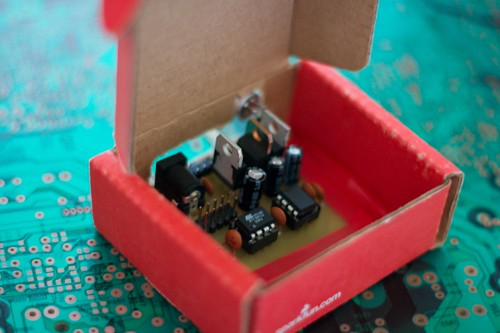
Lightbar Visualiser

Getting a bit more technical:

The microphone picks up the noise and sends this to the LM386 amp, which amplifies it about 200x before it’s read by the ATtiny13’s ADC at 8-bit resolution. The ATtiny13 then keeps a running average of the noise level, and flashes the LEDs if the current volume exceeds the average by a scalar amount.
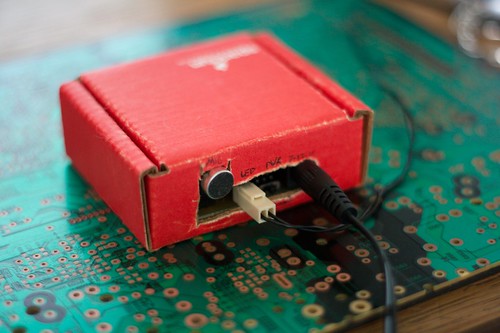
Lightbar Visualiser

As a result, the LEDs flash on when the music hits a peak, and are off otherwise - no matter what volume.
The brightness of the LEDs is also somewhat correlated to the loudness of the peak, since a louder peak will generally keep the LEDs on for longer.

Check out the video of it in action:

Download the schematic, PCB layout, code:
https://randomskk.net/projects/lightstrip/ (all files released under Creative Commons BY-SA-NC 3.0).

17 Responses to “Final Lightbar Controller”

  1. [...] - SparkFun - Light bar controller Read more | Permalink | Comments | Read more articles in Electronics | Digg this! Source: MAKE [...]

  2. [...] an interesting DIY light bar controller that might interest your weekend hacking desires. This device analyses the music it picks up via [...]

  3. hi, i’m very intested in your project.
    i was reading the code and find some weird stuff.

    firstly, avg isn’t initialised does it matter?
    secondly, all your variable are char type. i guess it’s an error?

  4. avg not being initialised - nope, it doesn’t matter because avr-libc automatically initialises all variables to 0. Bad coding practise, though!
    Char type isn’t an error, either - it can be used as a one-byte integer which is all I need. It’s basically the same as uint8_t but quicker to type.

  5. thanks, i’m going to translate your code for an 16F88 an see what i get.
    i’ve done a similar thing but it wasn’t really ideal.
    i kept all frequency below 100Hz and 0V = duty 0% and 1.2V = 100% it’s was only working with the maximum volume.

  6. one last question (i hope^^) when duty = 250, duty cycle is at 100% ?

  7. In my case, duty varies from 0 to 100. Those two last for loops set the LED on, do three nops for each iteration i

  8. well, after re-reading your code, if i understand correctly you light the led if the audio signal (without the negative part) is 1.3 times superior to the average, am i right?

    how much time last a nop? (in µs)

    each time the lead are turned on, the las loop do 300 nop

  9. Right, if the audio signal is 1.3 times average - you can change this for your microphone, amplifier etc since it makes the biggest difference on what volumes turn it on.
    A nop is one clock cycle long - on a 16MHz clock, that’s 1/16000000 of a second, while on a 1.2MHz that’s only 1/1200000 seconds.

  10. Do you have a BOM for this? What are the in/output voltages? Can I use less LEDS? I have a cool project i’m trying to do and am trying to redo a board like this to fit in a 0.70″ ID tube… Any help would be great….

  11. Brilliant!

  12. when i compile this in avr studio, it says the code is much to large to fit on an ATtiny13.

    (250.4% full for program space, 412.5% full for data)

    i’m using avr studio 4, and winavr 20080512

    any suggestions?

  13. That’s pretty odd. I can only imagine AVR Studio is adding lots of useless header files or something. Check the optimisation settings - when I compile this on avr-gcc I’m using -Os which optimises for minimum size.

  14. i am compiling with avr-gcc and using -Os. I am pretty sure it’s just adding useless libraries, but i’m not really sure how to stop it since the only #includes are the ones that are in your code…

    could you send me the .hex file so i don’t have to worry about how it’s compliling?

  15. Sure thing, here you go:
    https://randomskk.net/projects/lightstrip/lightstrip.hex

  16. I figured out the cause of the problem. When I compile with “PEAK” as 1.3, the code size is huge. When I compile with “PEAK” as a non-float number, it’s small and fits the attiny13. Do you get a significant change in code size when you do this?

  17. 8bits micro controllers are not made for floating point instructions so ofcorse it will make a huge difference when you use floating points

Leave a Reply